

![[packet storm]](/logos/linegray.webp)
 About
About Files
Files News
News Vote
Vote Help
Help Changes
 Tracker
 API
API Advertise
 Contact
 Store
Store Join
Join Login
LoginSetting Preferences / Social Links
From Account Management
From Account Management
The amount of data you want to share with the general public or other users remains within your control under your user settings. To access your settings, click the Menu button at the upper left of your screen ( ) and then click on
Under the Preferences menu, you will see options for both email settings and social network settings.
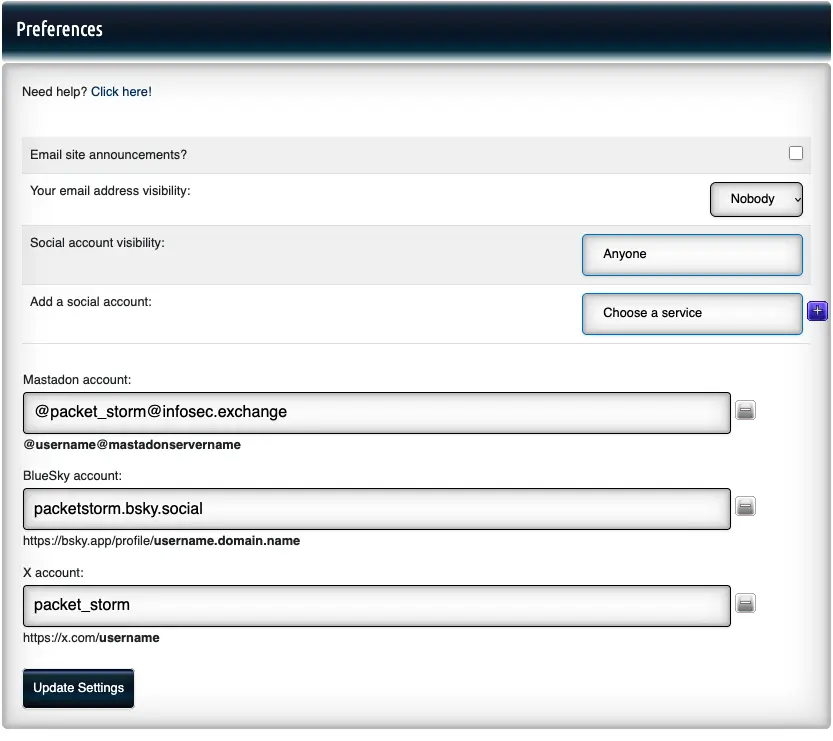
The Email site announcements? box is unchecked by default. Checking it means you want to receive site updates via email from Packet Storm. Although we do not currently send out site updates via email, we would want your permission to reach out in the future, assuming you want to hear from us. We get it.
Under Your email address visibility, you can use the pulldown to select Anyone, Members, or Nobody. Setting this to Anyone will let any visitor of the site see your email address. Setting this to Members only allows logged in users to see this information. If you set this to Nobody, it will not be shown anywhere on the site.
For social settings, you will see two related options. One is Social account visibility and the other is Add a social account.
Under Social account visibility you can set your visibility to Anyone or Members. Anyone means anyone can view this information on your profile. Members means only logged in users can see this information on your profile.
If you want to add a social account, choose a service from the pulldown under Add a social account and then click the button. This provides you with an entry box for the information. The
  button next to a given entry box allows you to delete the entry for that service. Any services you already have populated will show up in this section every time you go to your Settings.
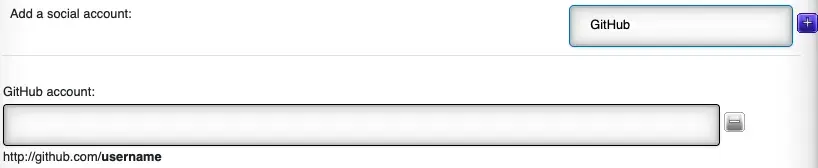
Note: After you've added a social account, made any adjustments on visibility for your social settings or email, or made a change to your site announcement preferences, you are required to click Update Settings for the changes to take effect.
) and then click on
Under the Preferences menu, you will see options for both email settings and social network settings.
The Email site announcements? box is unchecked by default. Checking it means you want to receive site updates via email from Packet Storm. Although we do not currently send out site updates via email, we would want your permission to reach out in the future, assuming you want to hear from us. We get it.
Under Your email address visibility, you can use the pulldown to select Anyone, Members, or Nobody. Setting this to Anyone will let any visitor of the site see your email address. Setting this to Members only allows logged in users to see this information. If you set this to Nobody, it will not be shown anywhere on the site.
For social settings, you will see two related options. One is Social account visibility and the other is Add a social account.
Under Social account visibility you can set your visibility to Anyone or Members. Anyone means anyone can view this information on your profile. Members means only logged in users can see this information on your profile.
If you want to add a social account, choose a service from the pulldown under Add a social account and then click the
button. This provides you with an entry box for the information. The button next to a given entry box allows you to delete the entry for that service. Any services you already have populated will show up in this section every time you go to your Settings.
Note: After you've added a social account, made any adjustments on visibility for your social settings or email, or made a change to your site announcement preferences, you are required to click Update Settings for the changes to take effect.
Help Section

The Electronic Frontier Foundation is the leading nonprofit organization defending civil liberties in the digital world.
The Electronic Frontier Foundation is the leading nonprofit organization defending civil liberties in the digital world.